- 개요
이어서 언리얼 엔진에서 GameLift 플러그인을 사용하기 위한 작업을 진행한다
*** 언리얼 엔진 5.5 이상부터는 기초 세팅 (2)의 작업을 생략하고 진행할 수 있다 ***
1) GameLift 플러그인 관련 파일 다운로드
https://github.com/amazon-gamelift/amazon-gamelift-plugin-unreal/releases
Releases · amazon-gamelift/amazon-gamelift-plugin-unreal
The Amazon GameLift Plugin for Unreal contains libraries and native UI that makes it easier to access GameLift resources and integrate GameLift into your Unreal game. You can use the GameLift Unrea...
github.com
위의 경로에서 GameLift 관련 플러그인 파일을 다운로드한다
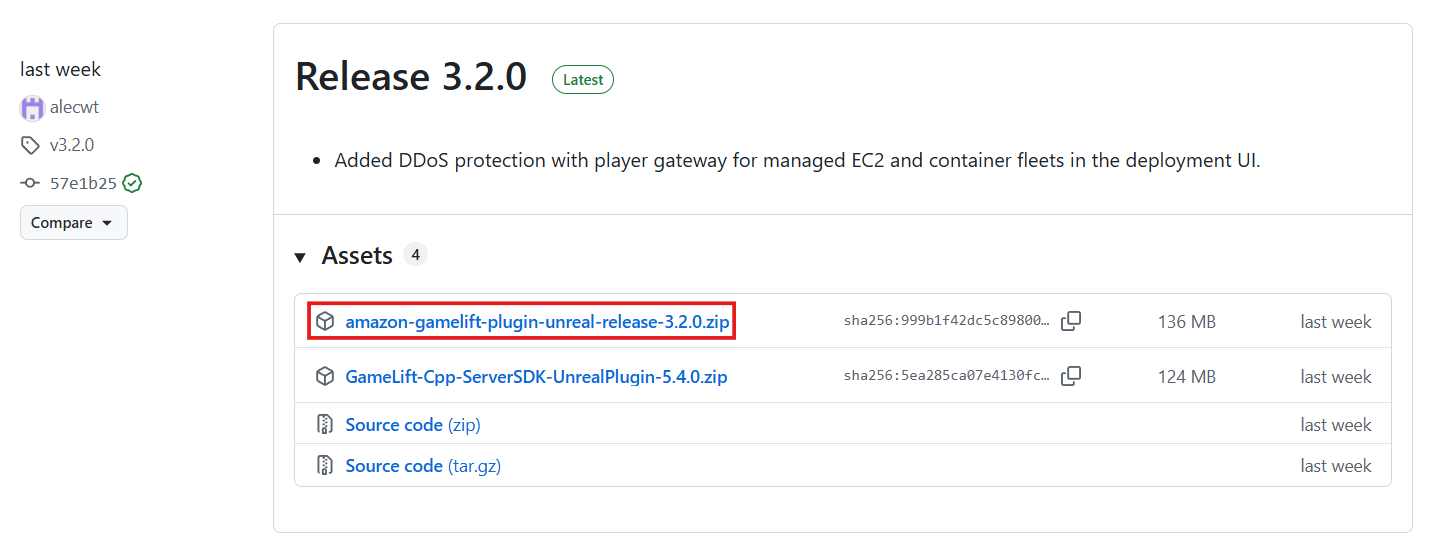
사용할 버전에 맞게 파일을 다운로드한다
2) 언리얼 엔진에 GameLift 플러그인 추가
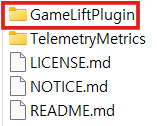
사용할 프로젝트에 Plugins 폴더를 생성하고 압축폴더안의 GameLiftPlugin을 해당 폴더에 저장한다
2 - 1) uproject 파일 수정
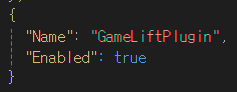
uproject 파일에 GameLiftPlugin 플러그인을 추가하고 활성화한다
2 - 2) build.cs 파일 수정

GameLiftPlugin 플러그인의 GameLiftServerSDK 모듈을 참조하도록 설정한다
2 - 3) 클라이언트 대상의 Target.cs 파일 추가

클라이언트를 대상으로 하는 Taget.cs 파일을 추가한다
3) 마무리 작업

위와 같이 작업한 후에 기존의 Intermediate 폴더와과 Binaries 폴더를 삭제하고
Generate Visual Studio project files 버튼을 선택하여 sln 파일을 재구성한다
재구성이 끝난후에 문제없이 빌드되었다면 GameLift 플러그인의 추가가 완료된 것이다
'언리얼 엔진 - 게임 프로젝트 > AWS GameLift를 활용한 데디케이트 FPS 프로젝트' 카테고리의 다른 글
| AWS - 3) Identity Center 사용자 생성 (0) | 2026.03.27 |
|---|---|
| AWS - 2) AWS 사용자 유형 (0) | 2026.03.26 |
| AWS - 1) AWS 요금 관리 (0) | 2026.03.26 |
| 기초 세팅 - 2) GameLift Server SDK + 언리얼 엔진 플러그인 생성 (1) (0) | 2026.03.20 |
| 기초 세팅 - 1) 언리얼 엔진 소스 빌드 + GameLift 사용을 위한 설정 (0) | 2026.03.19 |