728x90
반응형
- 개요
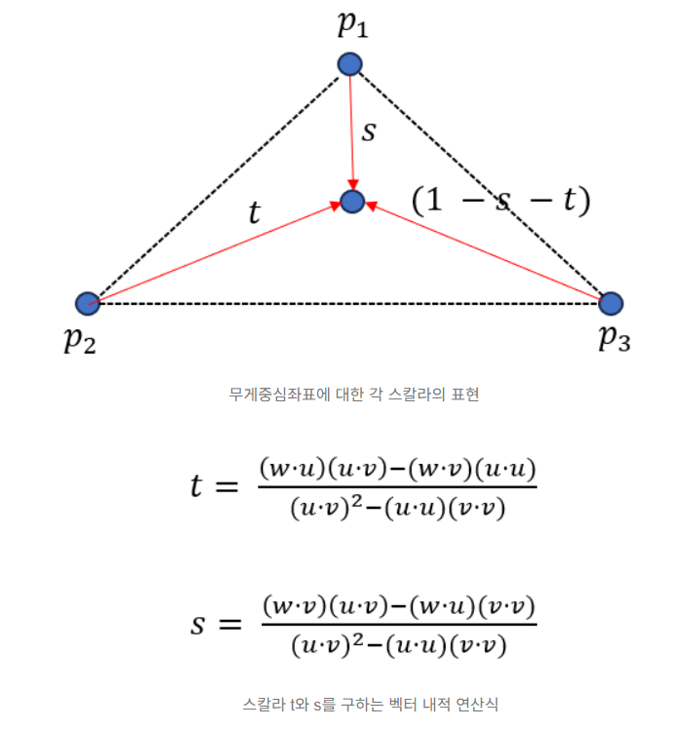
삼각형의 무게중심좌표에 대한 세개의 스칼라 t, s, 1 - t - s의 계산식은 위와 같다
무게중심좌표의 값을 통해 주어진 픽셀이 삼각형의 세 점으로부터 얼마나 영향을 받는지를 파악할 수 있다
예를 들어 무게중심좌표의 값이 (0.3, 0.3, 0.3)이라면
삼각형의 세 점은 삼각형의 무게중심에 균일하게 영향을 주는 것을 의미한다
따라서 메시의 정점에 설정된 부가 정보와 무게중심좌표를 함께 활용하여 삼각형 내부에 시각효과를 적용해본다
- 예제
...

// 렌더하는 함수
void SoftRenderer::Render2D()
{
    // 렌더하기 위해 가져오는 레퍼런스
    auto& r = GetRenderer();
    const auto& g = Get2DGameEngine();

    // 배경에 격자 그리기
    DrawGizmo2D();

    // 그릴 삼각형 메시 데이터의 선언 - 3개의 정점 + 그릴 삼각형의 개수
    static constexpr size_t vertexCount = 3;
    static constexpr size_t triangleCount = 1;

    // 정점 버퍼를 생성 -> 첫 번째 정점(0, 0.25) / 두 번째 정점(-0.5, -0.25) / 세 번째 정점(0.5, -0.25)
    // 추가적으로 정점별로 색상 정보를 추가 -> R / G / B
    static constexpr std::array<Vertex2D, vertexCount> rawVertices = {
        Vertex2D(Vector2(0.f, 0.25f), LinearColor(1.f, 0.f, 0.f)),
        Vertex2D(Vector2(-0.5f, -0.25f), LinearColor(0.f, 1.f, 0.f)),
        Vertex2D(Vector2(0.5f, -0.25f), LinearColor(0.f, 0.f, 1.f))
    };

    // 인덱스 버퍼를 생성
    // 삼각형의 정점 순회 : 첫 번째 정점 -> 세 번째 정점 -> 두 번째 정점
    static constexpr std::array<size_t, triangleCount * 3> indices = {
        0, 2, 1
    };

    // 크기 변환 행렬
    Vector3 sBasis1(currentScale, 0.f, 0.f);
    Vector3 sBasis2(0.f, currentScale, 0.f);
    Vector3 sBasis3 = Vector3::UnitZ;
    Matrix3x3 sMatrix(sBasis1, sBasis2, sBasis3);

    // 회전 변환 행렬
    float sin = 0.f, cos = 0.f;
    Math::GetSinCos(sin, cos, currentDegree);
    Vector3 rBasis1(cos, sin, 0.f);
    Vector3 rBasis2(-sin, cos, 0.f);
    Vector3 rBasis3 = Vector3::UnitZ;
    Matrix3x3 rMatrix(rBasis1, rBasis2, rBasis3);

    // 이동 변환 행렬
    Vector3 tBasis1 = Vector3::UnitX;
    Vector3 tBasis2 = Vector3::UnitY;
    Vector3 tBasis3(currentPosition.X, currentPosition.Y, 1.f);
    Matrix3x3 tMatrix(tBasis1, tBasis2, tBasis3);

    // 모든 아핀 변환을 곱한 합성 행렬 생성, 크기-회전-이동 순으로 적용
    Matrix3x3 finalMatrix = tMatrix * rMatrix * sMatrix;

    // 행렬 곱이 적용된 각 정점을 렌더링에 사용할 정점 버퍼에 저장
    // 추가적으로 색상도 각 정점에 적용
    static std::vector<Vertex2D> vertices(vertexCount);
    for (size_t vi = 0; vi < vertexCount; ++vi)
    {
        vertices[vi].Position = finalMatrix * rawVertices[vi].Position;
        vertices[vi].Color = rawVertices[vi].Color;
    }

    // 변환된 정점들 간의 선 그리기
    for (size_t ti = 0; ti < triangleCount; ++ti)
    {
        // 삼각형을 구성하는 3개의 점을 배열 tv에 저장
        size_t bi = ti * 3;
        std::array<Vertex2D, 3> tv = { vertices[indices[bi]] , vertices[indices[bi + 1]], vertices[indices[bi + 2]] };

        // 세 점의 좌표 중에서 최소 X/Y 값을 minPos 변수에 저장 + 최대 X/Y 값을 maxPos 변수에 저장
        Vector2 minPos(Math::Min3(tv[0].Position.X, tv[1].Position.X, tv[2].Position.X), Math::Min3(tv[0].Position.Y, tv[1].Position.Y, tv[2].Position.Y));
        Vector2 maxPos(Math::Max3(tv[0].Position.X, tv[1].Position.X, tv[2].Position.X), Math::Max3(tv[0].Position.Y, tv[1].Position.Y, tv[2].Position.Y));

        // 첫 번째 점에서 두 번째 점으로 향하는 벡터 u와 첫번째 점에서 세 번째 점으로 향하는 벡터 v 생성
        Vector2 u = tv[1].Position - tv[0].Position;
        Vector2 v = tv[2].Position - tv[0].Position;

        // 무게중심좌표 계산식에서의 공통 분모 생성
        float udotv = u.Dot(v);
        float vdotv = v.Dot(v);
        float udotu = u.Dot(u);
        float denominator = udotv * udotv - vdotv * udotu;

        // 공통분모가 0인 퇴화삼각형이라면 Render하지 않음
        if (denominator == 0.0f)
        {
            continue;
        }

        // 1/공통분모를 계산
        float invDenominator = 1.f / denominator;

        // minPos 변수와 maxPos 변수로 구성된 데카르트 좌표계의 벡터 좌표를 스크린 좌표계의 픽셀로 변환
        ScreenPoint lowerLeftPoint = ScreenPoint::ToScreenCoordinate(_ScreenSize, minPos);
        ScreenPoint upperRightPoint = ScreenPoint::ToScreenCoordinate(_ScreenSize, maxPos);

        // 두 점이 화면 밖을 벗어나는 경우 클리핑 처리
        lowerLeftPoint.X = Math::Max(0, lowerLeftPoint.X);
        lowerLeftPoint.Y = Math::Min(_ScreenSize.Y, lowerLeftPoint.Y);
        upperRightPoint.X = Math::Min(_ScreenSize.X, upperRightPoint.X);
        upperRightPoint.Y = Math::Max(0, upperRightPoint.Y);

        // 삼각형을 둘러싼 사각형 영역의 픽셀을 모두 순회
        for (int x = lowerLeftPoint.X; x <= upperRightPoint.X; ++x)
        {
            for (int y = upperRightPoint.Y; y <= lowerLeftPoint.Y; ++y)
            {
                // 벡터의 내적을 사용하기 위해 스크린 좌표계의 픽셀을 다시 데카르트 좌표계의 벡터로 변환
                ScreenPoint fragment = ScreenPoint(x, y);
                Vector2 pointToTest = fragment.ToCartesianCoordinate(_ScreenSize);

                // 무게중심좌표의 분자값 계산에 사용할 벡터의 내적값 계산
                Vector2 w = pointToTest - tv[0].Position;
                float wdotu = w.Dot(u);
                float wdotv = w.Dot(v);

                // 최종 무게중심좌표 계산
                // s 스칼라 + t 스칼라 + (1 - s - t) 스칼라의 값 계산
                float s = (wdotv * udotv - wdotu * vdotv) * invDenominator;
                float t = (wdotu * udotv - wdotv * udotu) * invDenominator;
                float oneMinusST = 1.f - s - t;

                // 계산한 세개의 무게중심좌표의 값이 [0, 1]의 범위내에 있는 경우에만 점을 찍음
                // 이때 각 정점에 적용된 색상 정보를 무게중심좌표로 선형 보간하여 반영
                if (((s >= 0.f) && (s <= 1.f)) && ((t >= 0.f) && (t <= 1.f)) && ((oneMinusST >= 0.f) && (oneMinusST <= 1.f)))
                {
                    LinearColor outColor = tv[0].Color * oneMinusST + tv[1].Color * s + tv[2].Color * t;
                    r.DrawPoint(fragment, outColor);
                }
            }
        }
    }

    // 현재 위치, 크기, 각도를 화면에 출력
    r.PushStatisticText(std::string("Position : ") + currentPosition.ToString());
    r.PushStatisticText(std::string("Scale : ") + std::to_string(currentScale));
    r.PushStatisticText(std::string("Degree : ") + std::to_string(currentDegree));
}

...
위와 같이 Render2D 함수를 구성하여 1개의 삼각형을 그리고 색칠한다
이전과 동일하게 삼각형을 둘러싼 사각형 영역의 모든 픽셀을 순회하면서
각 픽셀의 무게중심좌표를 계산하고 그 값이 [0, 1]의 범위 내에 존재하는지 판단하여 그릴 픽셀을 선별한다
다만 색을 칠하는 로직에서 픽셀에 부여된 색상 정보를 무게중심좌표로 선형보간하여 반영하는 로직을 추가한다
- 최종 실행 결과

728x90
반응형
'수학 > 이득우의 게임 수학 - 실습 예제' 카테고리의 다른 글
| 게임 월드 탐험 예제 (0) | 2026.01.28 |
|---|---|
| 텍스처 매핑 (0) | 2025.12.17 |
| 무게중심좌표를 활용한 와이어프레임의 삼각형 색칠 (0) | 2025.12.03 |
| 와이어프레임 렌더링의 구현 (0) | 2025.11.26 |
| 벡터의 내적을 활용한 벡터의 투영 구현 (0) | 2025.11.19 |